
The advent of innovative technology and modern learning techniques has opened an array of possibilities for adult and student learning. L&D leaders and educators can customize their training and teaching instruction for employees and students to deliver the best learning experience possible.
With technological advancement, digital learning is no longer confined to static online courses. It has become an interactive and technology-driven space that adapts to the needs of modern learners. With the increasing reliance on digital platforms, it is vital to explore ways to optimize course delivery and improve learner engagement. The focus is no longer just on delivering content but also on making learning more intuitive, practical, and aligned with resolving real-world challenges.
Carahsoft recently conducted a webinar in partnership with Harbinger Group, titled ‘The Digital Learning Experience: Top 3 Trends for 2025’ featuring industry experts, Alistair Lee, Principal Evangelist at Adobe, Scott Biegel, Principal Solution Consultant at Adobe, and Umesh Kanade, Vice President – Capability Development at Harbinger Group. Hosted by Shannon Teel, Partner Sales Leader at Adobe, this webinar discussed the top three trends in the digital learning space for L&D and education leaders to consider.

Trend 1: AI and Generative AI
AI simulates human intelligence in machines, while GenAI uses algorithms to autonomously create new content. It is reshaping digital learning by delivering learning experiences tailored to individual needs. This ensures learners receive targeted recommendations that align with their goals and preferred learning styles.
GenAI can provide L&D teams and educators as well as adult learners and students with learning recommendations based on previous course work, content consumed by peers, and the delivery modality from previous content selections. By observing the learning patterns and learner behaviors, GenAI can aid trainers and educators in populating forms from a variety of different mediums. For learners, it can help improve learning results and stay engaged with relevant content.
Beyond personalization, AI-based automated custom content development is accelerating course development, reducing both time and costs while ensuring high-quality, customized learning experiences at scale. AI-based tools can generate course content, including quizzes, assessments, interactive simulations, and multimedia elements.
Some examples include:
Text
- Session outlines
- Slide structure or speaker notes
- Abstracts or introductions
- Quiz questions
- Polls or group exercises
Images
- Backgrounds for virtual rooms or camera
- Whiteboard exercises
- Slide imagery
Audio
- Lobby music
- Sound effects
- Announcements
- Translations
Video
- Localized video
- Stringer or lobby content
AI can analyze existing graphics and media assets to maintain a consistent style, ensuring newly generated course content aligns seamlessly. This helps prevent generic outputs and avoids copyright issues while enhancing the overall quality of the learning materials.
Tips to Effectively Generate Content Using AI
Apart from learning content, AI can be leveraged to generate teaching instruction plans and L&D workflows. For example, AI tools can be used to create automated leadership coaching plans and analysis, add clarity to session notes, improve lecture structure, or develop targeted employee training framework.
However, L&D leaders, educators, and instructional designers need to implement the right prompt writing techniques to best use AI for generating digital learning content.
“Use AI to help you with AI. A chatbot can help you create a more effective prompt. You can prompt a chatbot to ask you questions to get a better result. So, instead of just producing a result, tell the chatbot to ask you questions related to the topic you’re looking for, and it will do so before producing the result. I think you’ll get much better qualitative content out of that,” shared Alistair.
It’s highly recommended to consider using the ‘CISCO’ prompt structure when interacting with AI chatbots for generating digital learning content.
Context: Explain your role and goal
Intent: Describe the intent of your prompt and what you want to achieve
Style: Consider what tone you want to employ
Commands: List out detailed instructions and rules to follow
Outcome: Outline the specific format you want to receive the results in
Educators with special considerations, such as privacy concerns, should consider retrieval augmented generation (RAG) models or retrieval augmented language models (REALM). These models are trained specifically on your content. This way, rather than asking public AI generators, agencies or organizations can utilize RAG and REALM to ensure accuracy and internally guided content.
Agentic AI is another hot trend in digital learning. It improves learning success and drives business outcomes with next-gen learning environments, intelligent tutoring systems, faster content development, custom learning pathways, automated assessment, and AI-driven gamification. To know how to effectively leverage Agentic AI in eLearning, download this comprehensive practical guide.
Trend 2: Advanced Learning Analytics
Learning is driven by engagement, and therefore, it is vital to ensure learners are listening and are engaged. Advanced learning analytics can help L&D leaders and educators drive engagement and tailor their training and lesson plans.
Traditionally, standard reports only featured data on how much time learners spent in the learning space. Contrastingly, modern digital learning analytics can not only inform L&D teams and educators how long learners were present in the learning space but also how connected they were.
Some key learner engagement indicators include:
- Asking questions
- Responding to polls
- Utilizing chat features
- Downloading learning materials
- Enabling their microphone
- Interacting with emotes
Digital reports can feature data on whether the window was in focus or if the learner was taking notes, chatting, or responding to polls. Each L&D leader or educator should consider how they want to measure engagement to determine the effectiveness of sessions. Indicators of elements that drive interactions can help them optimize and perfect the digital learning experience.
A more engaged learning environment not only enhances knowledge retention but also fosters a stronger connection between learners and instructors, making the experience more interactive and valuable. Engagement is also influenced by the relevance and adaptability of content. When learning materials are updated, personalized, and aligned with learners’ goals, engagement improves. If the content is outdated or disconnected from real-world applications, engagement levels may decline, signaling the need for modifications.
L&D teams and educators should consider continuously monitoring and refining digital learning and engagement strategies through advanced learning analytics. This will help them create a learning experience that feels dynamic, relevant, and impactful.
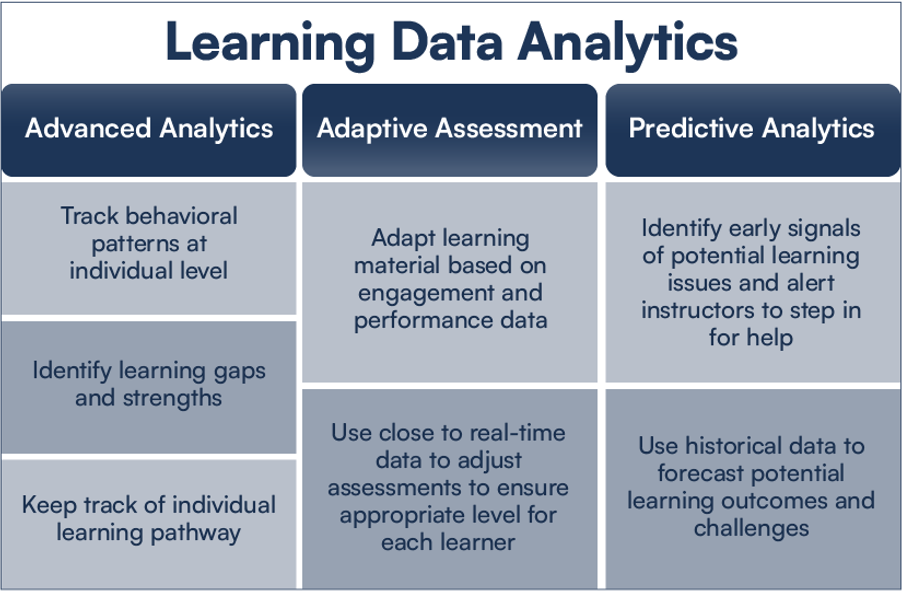
Apart from advanced analytics, adaptive assessment and predictive analytics are the two other key aspects of digital learning data analytics. Here’s a snapshot of the three types of digital learning data analytics discussed in the webinar:
Trend 3: Hybrid Learning Models
Traditionally, L&D leaders and educators had to consider whether their sessions should be conducted in a synchronous or asynchronous form. With the advent of digital learning, they must now determine whether their learning and training sessions should be conducted in person or virtually, or in hybrid form.
They also need to decide if the sessions must incorporate features such as:
- Microlearning
- Compliance learning
- Collaborative breakouts
- Simulations
- On-the-job learning
When coming to a decision, it is important to consider the learning objective, and the advantages and weaknesses of each, so learners get the most out of the session. L&D teams and educators should not be afraid to experiment with new modalities, as it may bring out the strength of a session, enhancing the learning experience.
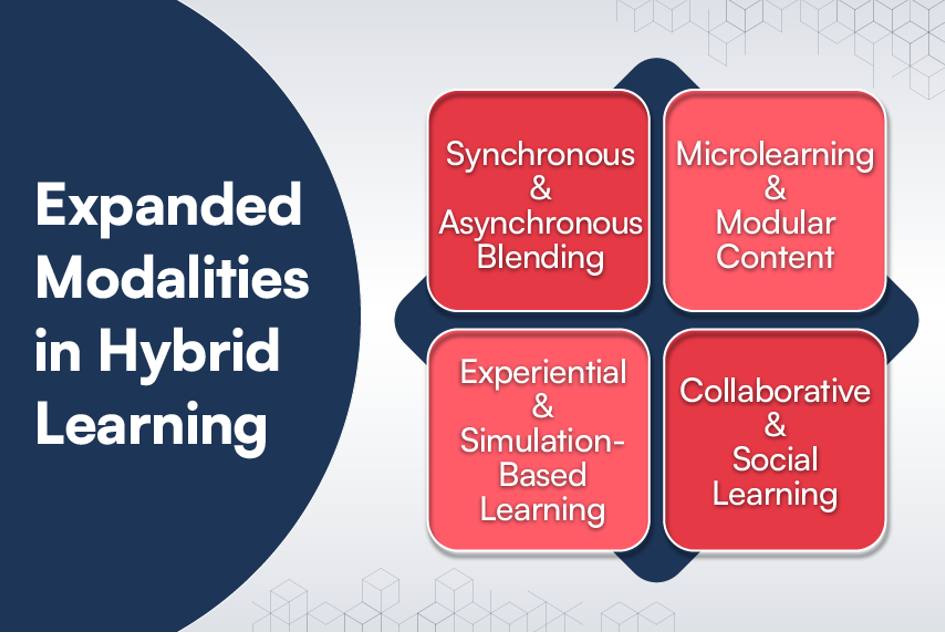
Expanded Modalities in Hybrid Learning
Expanded modalities in hybrid learning are the range of ways in which content is delivered, and learning is experienced, going beyond traditional in-person and online formats. The idea is to enhance flexibility, engagement, and personalization by offering multiple paths for learners to interact with the material, instructors, and peers.
Expanded modalities aim to meet diverse learner needs and preferences while maximizing the strengths of both digital and physical environments. In modern hybrid learning models, this flexibility is key to increasing accessibility, equity, and learner success.
Here are some expanded modalities in hybrid learning:
Parting Thought
With AI, advanced learning analytics, and hybrid learning, the digital learning experience is better than ever. These technologies and models allow L&D leaders and educators to refine their approach, making learning more interactive, responsive, and accessible. They can not only optimize the learning experience but also increase course completion rates, while ensuring learners are well-equipped for the future.
For today’s workforce, learning isn’t just about acquiring new knowledge, it’s about career advancement, staying relevant in their industry, or transitioning to new roles. With smarter learning systems that adapt to individual progress, digital learning helps them build practical skills that directly impact their professional growth.
To learn more about digital learning trends for 2025, watch the webinar, “The Digital Learning Experience: Top 3 Trends for 2025.” To take a deeper dive into Adobe’s eLearning products, contact us to schedule a complimentary one-on-one demonstration today!








 Education institutions face a myriad of cybersecurity challenges such as ransomware, third-party access to school systems, internal bad actors and stolen credentials. One of the most impactful vulnerabilities is a lack of awareness across school communities regarding security. For example, individuals who are unable to recognize a phishing text message that asks the receiver to click on an unsafe link because an account has been frozen may potentially put their own data and their school’s data at risk of exposure.
 Generative AI is still fairly new to the education space and educators are on both sides of the spectrum of acceptance—some prefer to erase it from their schools while others are open to embracing the up-and-coming technology for use cases not only in the classroom, but also to prepare students for the future workforce.