SimiTech - Issue History & Snapshots Reporter for Jira
Audits issue field updates and status transitions over time with point-in-time snapshot comparisons and exportable changelogs.
Complete Issue Change History at Scale
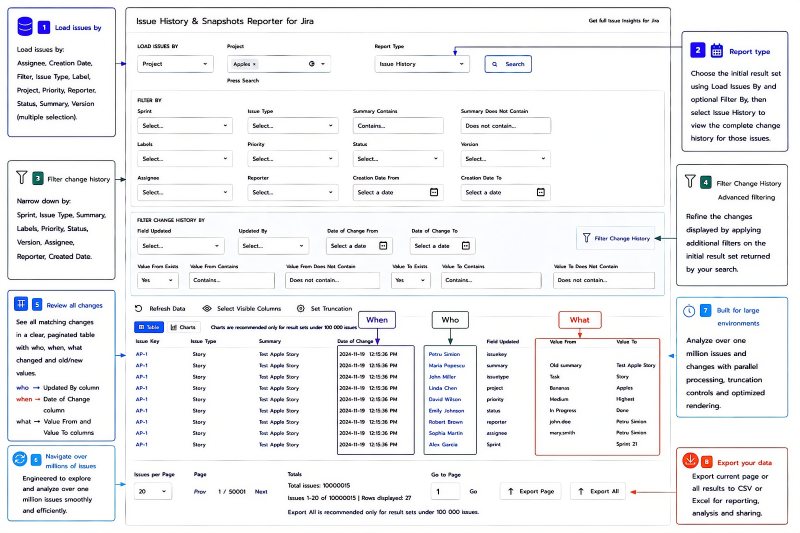
Issue History & Snapshots Reporter for Jira provides complete historical issue change visibility across projects, tested with over one million issues. Search and filter the initial issue set, then apply dedicated change-history filters to pinpoint exactly who changed what, when it changed, and the values before and after each update. A paginated, large-data architecture lets users navigate historical data across over one million issues without loading the entire result set into the browser. For deeper analysis, large history datasets can be exported to CSV or Excel, with exports tested with hundreds of thousands of issues.Results can also be visualized using built-in charts for quick analysis of historical change data.
Benefits:
- Complete change visibility: Review who changed what, when it changed, and the old and new values in one place.
- Two levels of filtering: Filter the issues to analyze, then independently filter their historical changes to find exactly the changes you need.
- Built for large Jira environments: Navigate historical data across over one million issues, using pagination and optimized processing instead of loading the entire dataset into the browser.
- Large-scale export: Export complete historical data for external reporting and analysis, with exports tested with hundreds of thousands of issues.
See Exactly What Issues Looked Like at Any Point in Time
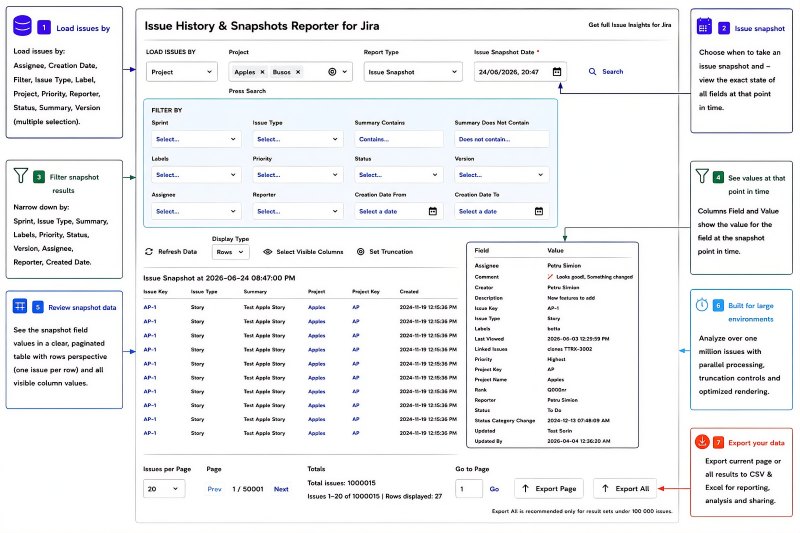
Issue Snapshot reconstructs the state of Jira issues at a selected historical date and time. Instead of reviewing individual changes one by one, teams can see the values of issue fields exactly as they existed at that specific moment. Snapshots can be generated across large issue populations, with the app designed for enterprise scale and tested with over one million issues. Results can be viewed in rows or columns depending on the analysis required, providing a direct historical view for audits, investigations, reporting, and point-in-time analysis.
Benefits:
- Reconstruct issue data at a selected historical date and time.
- See historical field values without manually interpreting individual changelog entries.
- Analyze point-in-time snapshots across large issue populations, with the app tested with over one million issues.
- Support audits and investigations with a clear historical representation of Jira data.
Compare Issue Snapshots Between Any Two Dates
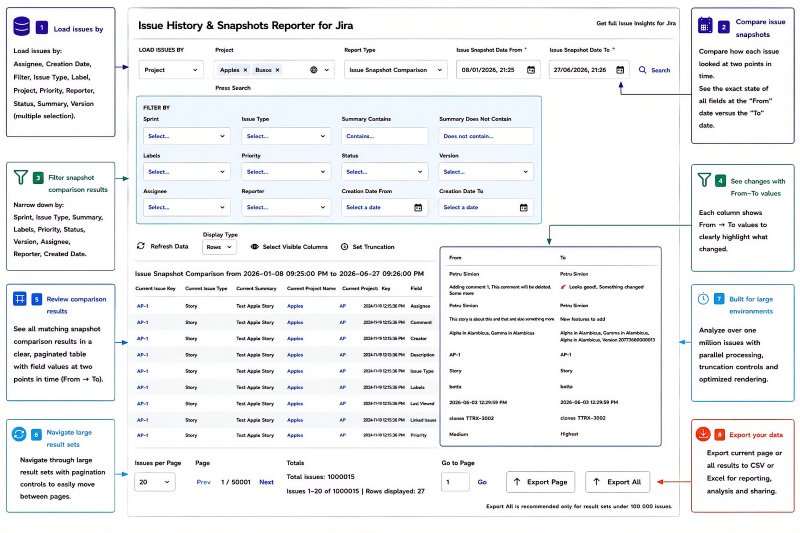
Issue Snapshot Comparison shows how Jira issues changed between two selected historical points in time. For each field, the report presents the value at the first snapshot alongside the value at the second snapshot, making differences immediately visible. Teams can compare historical states across many issues without manually reconstructing changes from individual changelog entries. This is particularly useful for audits, investigations, migrations, release reviews, and validating large-scale changes.
Benefits:
- Compare two historical issue states directly.
- See values at the first and second snapshot side by side.
- Identify differences without manually reconstructing change logs.
- Analyze historical changes across large issue populations.
Analyze Snapshots and Snapshot Comparisons in Columns
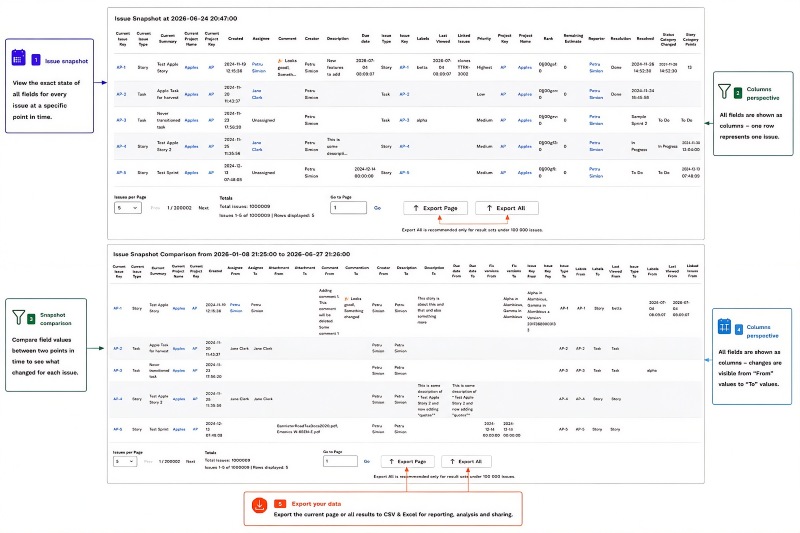
Issue History & Snapshots Reporter for Jira supports both Rows and Columns display modes for Issue Snapshot and Issue Snapshot Comparison reports. The Rows perspective is demonstrated in the preceding Snapshot and Snapshot Comparison features, while the Columns perspective presents each issue as a single row with historical field values organized across columns. For Snapshot Comparison, fields can be reviewed side by side using their values at the first and second historical points in time. This gives auditors, administrators, and analysts a compact issue-level perspective when working with historical Jira data.
Benefits:
- View Issue Snapshot and Snapshot Comparison results in a compact column display.
- Review each issue as a single row with historical field values organized across columns.
- Compare field values across two historical points in time in the Snapshot Comparison Columns view.
- Switch between Rows and Columns depending on the analysis required.
Visualize Historical Change Data with Built-In Charts
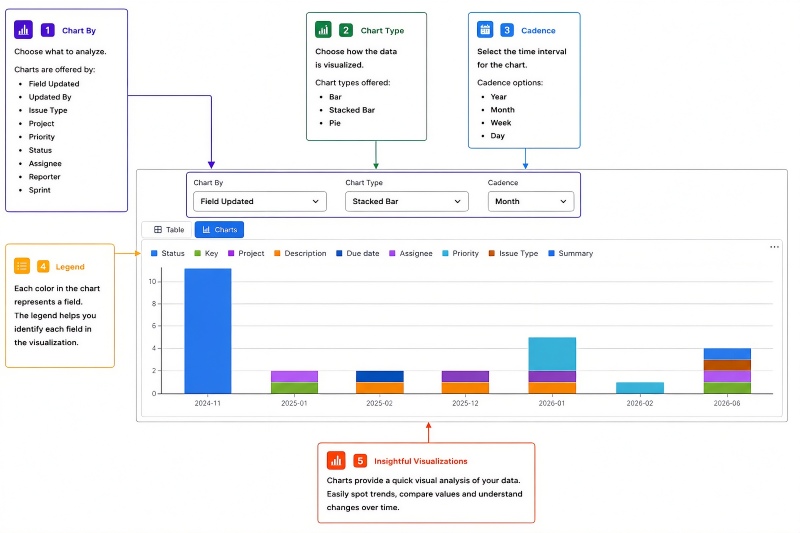
Issue History & Snapshots Reporter for Jira includes built-in charts that turn historical change data into visual summaries for faster analysis. Users can chart changes by Field Updated, Updated By, Issue Type, Project, Priority, Status, Assignee, Reporter, or Sprint. The same data can be visualized as Bar, Stacked Bar, or Pie charts, while cadence can be set to Year, Month, Week, or Day. This flexibility helps teams quickly identify patterns, compare activity, and understand how Jira data changes over time without first exporting the result set.
Benefits:
- Analyze history from multiple perspectives: Chart by Field Updated, Updated By, Issue Type, Project, Priority, Status, Assignee, Reporter, or Sprint.
- Choose the visualization that fits the analysis: Bar, Stacked Bar, or Pie.
- Analyze change activity over time using Year, Month, Week, or Day cadence.
- Spot patterns and compare historical activity directly inside Jira without first exporting the data.
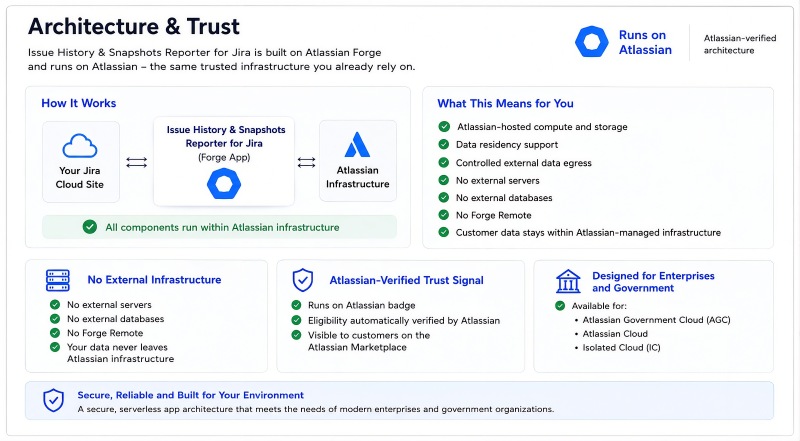
Architecture & Trust - Built on Forge and Runs on Atlassian
Issue History & Snapshots Reporter for Jira is built on Atlassian Forge and carries the Runs on Atlassian badge. The app uses Atlassian-hosted compute and storage, supports data residency, and provides controls for external data egress. It uses no external servers, no external databases, and no Forge Remote, keeping customer data within Atlassian-managed infrastructure. This architecture provides a strong trust signal for organizations with strict data privacy requirements, including enterprise and government environments.
Benefits:
- Runs on Atlassian: Uses Atlassian-hosted compute and storage, supports data residency, and provides controls for external data egress.
- No external infrastructure: No external servers, external databases, or Forge Remote.
- Atlassian-verified trust signal: Runs on Atlassian eligibility is automatically verified by Atlassian and the badge is visible to customers on the Atlassian Marketplace.
- Available across Atlassian Cloud environments: Atlassian Government Cloud (AGC), Atlassian Cloud, and Isolated Cloud (IC).