SimiTech - Fields Usage for Jira
Pinpoints where and how custom fields are used across projects and screens to help admins detect orphan fields before cleanups or migrations.
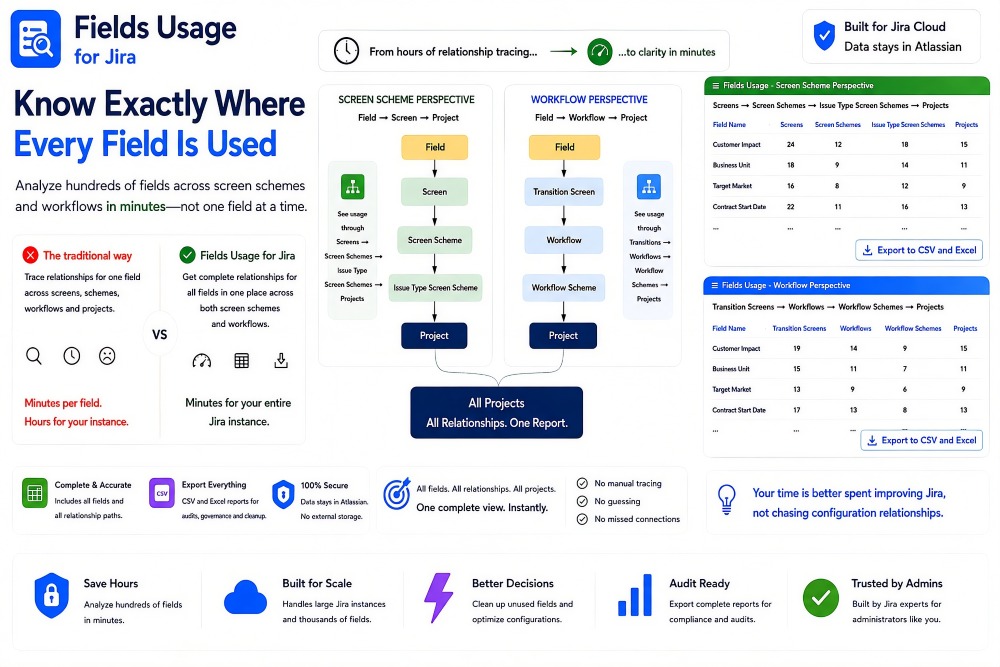
Fields Usage for Jira – Complete Configuration Relationship Analysis
Fields Usage for Jira gives Jira administrators a complete view of where fields are used across their Jira configuration without tracing each field manually. It analyzes hundreds of fields across both screen-scheme and workflow relationships and brings those relationships together in one place. Administrators can see how fields connect to screens, transitions, schemes, issue types, workflows, and projects. Instead of spending minutes tracing each individual field and hours across an entire Jira instance, the app provides clarity across all fields in minutes.
Benefits:
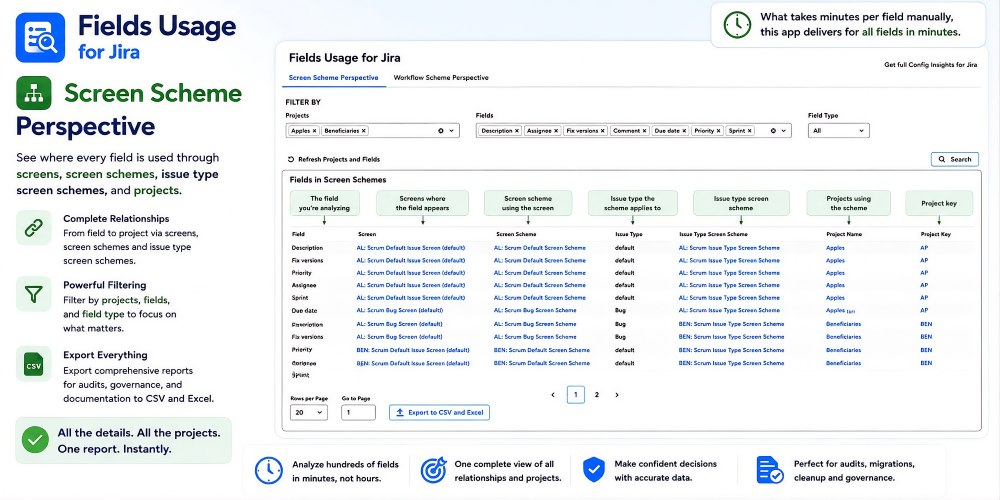
- Trace Field → Screen → Screen Scheme → Issue Type Screen Scheme → Project relationships.
- See complete field-to-project relationships in one report.
- Filter by projects, fields, and field type.
- Export comprehensive CSV and Excel reports for audits, migrations, cleanup, governance, and documentation.
The Screen Scheme Perspective shows where every field is used through Jira screens, screen schemes, issue type screen schemes, and projects. For each selected field, administrators can follow the complete relationship from the field to the screen where it appears and through the configuration layers that determine which projects use it. Projects, fields, and field types can be filtered to focus the report on the configuration that matters. The complete relationship report can then be exported to CSV and Excel for further analysis, audits, migrations, cleanup, governance, and documentation.
Benefits:
- Trace Field → Screen → Screen Scheme → Issue Type Screen Scheme → Project relationships.
- See complete field-to-project relationships in one report.
- Filter by projects, fields, and field type.
- Export comprehensive CSV and Excel reports for audits, migrations, cleanup, governance, and documentation.
Workflow Perspective
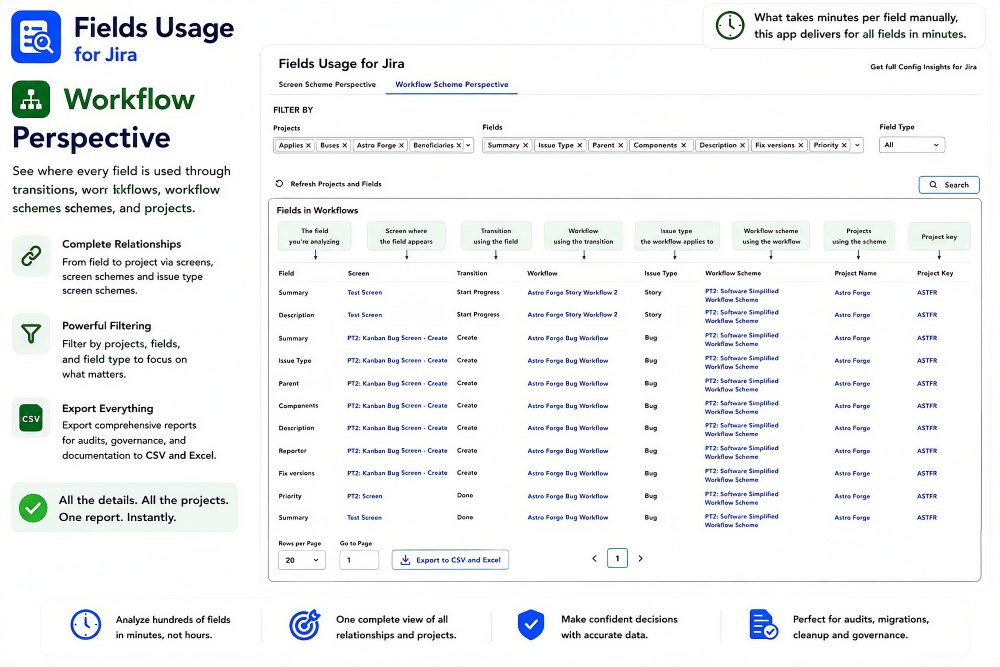
The Workflow Perspective shows where every field is used through transition screens, transitions, workflows, workflow schemes, and projects. For each selected field, administrators can follow the complete relationship from the screen where the field appears through the transition and workflow to the projects that ultimately depend on it. Projects, fields, and field types can be filtered to focus on specific areas of the Jira configuration. This provides a complete workflow-related field dependency report without manually tracing relationships across multiple Jira administration screens.
Benefits:
- Trace Field → Transition Screen → Transition → Workflow → Workflow Scheme → Project relationships.
- See complete workflow-related field dependencies across projects.
- Filter by projects, fields, and field type.
- Export comprehensive CSV and Excel reports for audits, migrations, cleanup, governance, and documentation.
Architecture & Trust
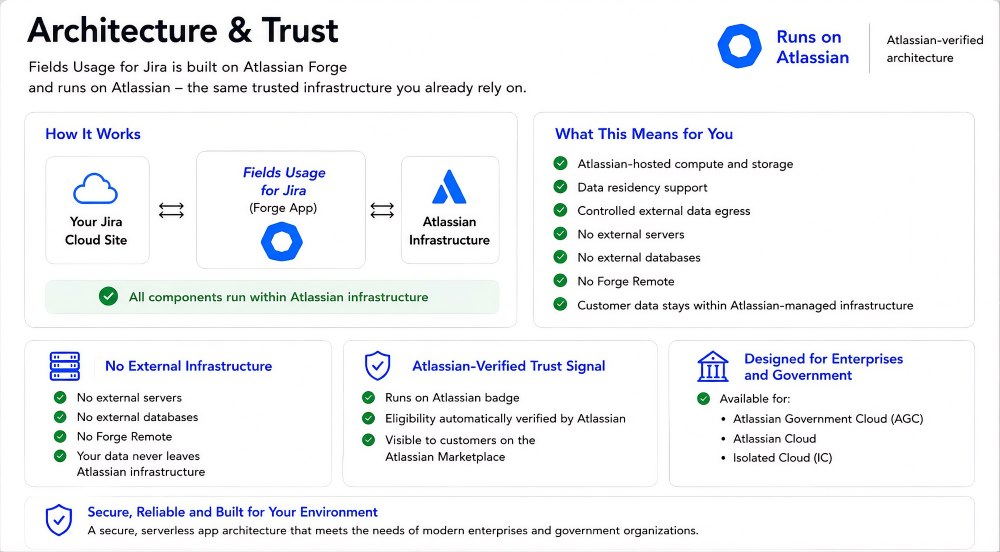
Fields Usage for Jira is built on Atlassian Forge and runs on Atlassian-managed infrastructure. It uses Atlassian-hosted compute and storage with no external servers, no external databases, and no Forge Remote. Customer data stays within Atlassian-managed infrastructure, and the app carries the Runs on Atlassian trust signal. The architecture is designed for enterprise and government environments and the app is available for Atlassian Cloud, Atlassian Government Cloud (AGC), and Isolated Cloud (IC).
Benefits:
- Runs on Atlassian with Atlassian-hosted compute and storage.
- No external servers, external databases, or Forge Remote.
- Customer data stays within Atlassian-managed infrastructure.
- Available for Atlassian Cloud, Atlassian Government Cloud (AGC), and Isolated Cloud (IC).