SimiTech - Config Insights for Jira  

SimiTech - Config Insights for Jira

Provides a high-level administrative overview mapping custom fields, roles, and workflows to help optimize and clean up Jira instances.
Step 1 of 5

Config Insights for Jira - Complete Jira Configuration Visibility

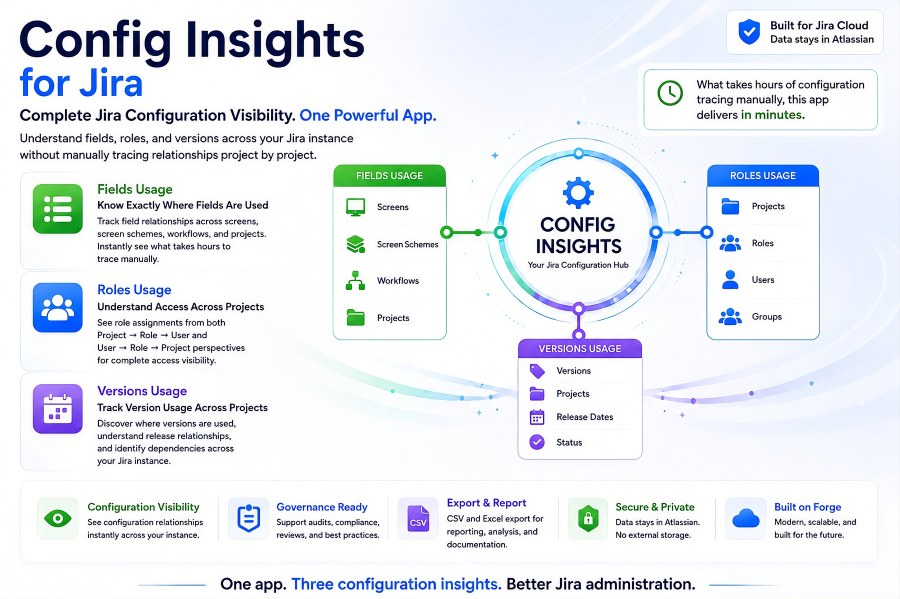
Config Insights for Jira brings Fields Usage, Roles Usage, and Versions Usage together in one app for complete Jira configuration visibility. It helps administrators understand field relationships, project role assignments, and version usage across the Jira instance without manually tracing configuration project by project. The app turns configuration analysis that can take hours into clear, structured insights in minutes. Teams can use the resulting visibility for administration, governance, audits, compliance reviews, cleanup, reporting, and documentation.

Config Insights for Jira - Complete Jira Configuration Visibility Config Insights for Jira - Complete Jira Configuration Visibility

Benefits:

  • One app provides three configuration perspectives: Fields Usage, Roles Usage, and Versions Usage.
  • Replaces hours of manual configuration tracing with structured visibility in minutes.
  • Supports governance, audits, compliance reviews, cleanup, reporting, and documentation.
  • Exports configuration data to CSV and Excel for further analysis and sharing.
Step 2 of 5

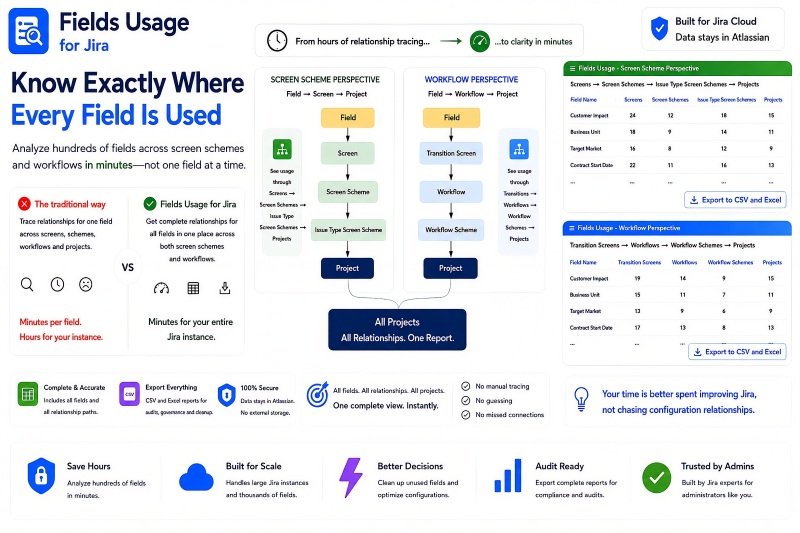
Fields Usage for Jira

Fields Usage for Jira shows exactly where Jira fields are used across screen schemes and workflows. From the screen scheme perspective, administrators can trace Field to Screen to Screen Scheme to Issue Type Screen Scheme to Project relationships. From the workflow perspective, they can trace Field to Transition Screen to Workflow to Workflow Scheme to Project relationships. Instead of investigating one field at a time, teams can analyze hundreds of fields and export complete relationship data to CSV and Excel.

Fields Usage for Jira Fields Usage for Jira

Benefits:

  • See complete field-to-project relationships through both screen scheme and workflow paths.
  • Analyze hundreds of fields across large Jira instances in minutes.
  • Identify unused fields and understand dependencies before configuration cleanup.
  • Export complete field usage reports to CSV and Excel for audits, governance, and analysis.
Step 3 of 5

Roles Usage for Jira

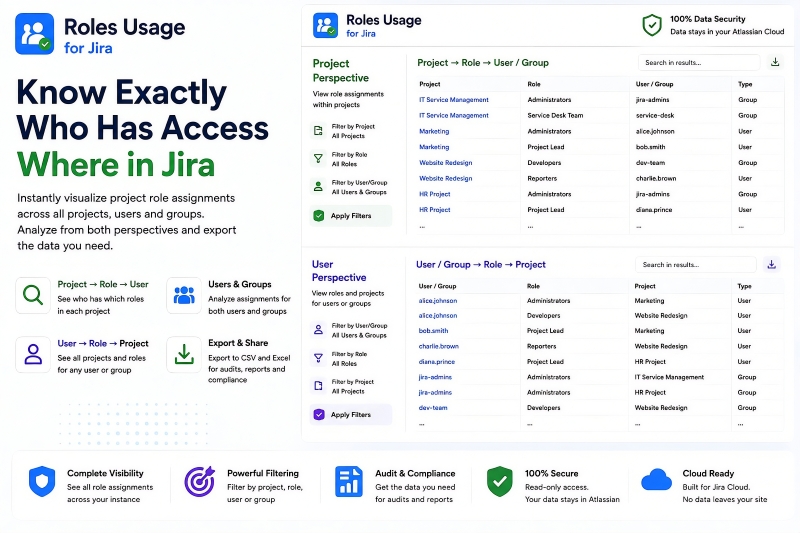
Roles Usage for Jira provides complete visibility into project role assignments across projects, users, and groups. The Project Perspective shows Project to Role to User or Group relationships so administrators can see who has which roles in each project. The User Perspective reverses the analysis to show User or Group to Role to Project relationships, making it easy to see every project and role associated with a specific user or group. Built-in filtering and CSV and Excel export make the resulting data useful for access reviews, audits, reporting, and compliance.

Roles Usage for Jira Roles Usage for Jira

Benefits:

  • See role assignments from both Project -> Role -> User/Group and User/Group -> Role -> Project perspectives.
  • Analyze assignments for both individual users and groups across the Jira instance.
  • Filter results by project, role, user, or group.
  • Export role assignment data to CSV and Excel for audits, reports, access reviews, and compliance.
Step 4 of 5

Product/Feature Name

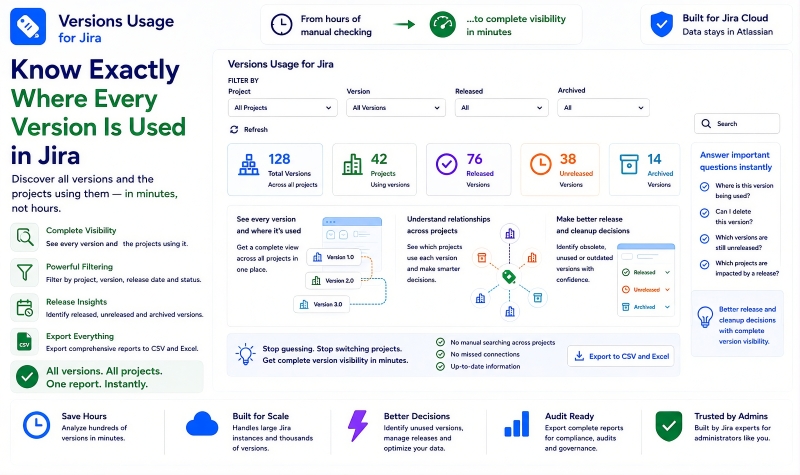
Versions Usage for Jira provides a complete view of Jira versions and the projects that use them. Administrators can filter by project, version, release state, and archive state while seeing released, unreleased, and archived versions in one report. The app makes cross-project version relationships visible so teams can identify obsolete, unused, or outdated versions and understand which projects may be affected by release decisions. Comprehensive results can be exported to CSV and Excel for cleanup, governance, audits, reporting, and further analysis.

Product/Feature Name Product/Feature Name

Benefits:

  • See every version and the projects using it across the Jira instance.
  • Filter by project, version, release state, and archive state.
  • Identify released, unreleased, archived, obsolete, unused, or outdated versions for better cleanup and release decisions.
  • Export comprehensive version usage reports to CSV and Excel.
Step 5 of 5

Architecture & Trust - Runs on Atlassian

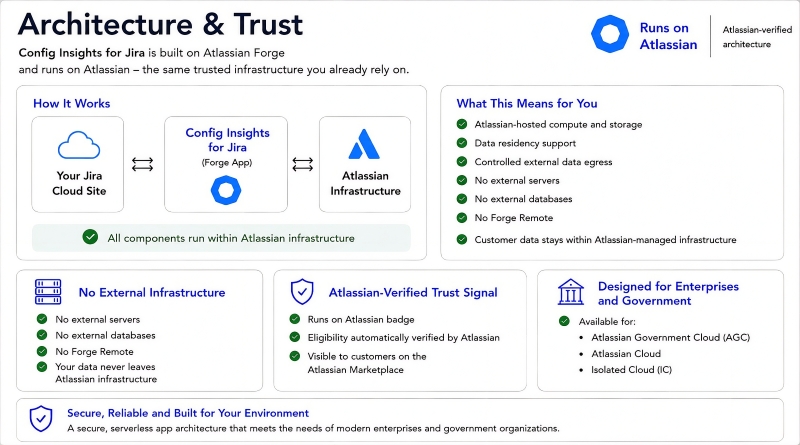
Config Insights for Jira is built on Atlassian Forge and runs on Atlassian-managed infrastructure. Its architecture uses Atlassian-hosted compute and storage, supports data residency, and does not require external servers, external databases, or Forge Remote. Customer data stays within Atlassian-managed infrastructure, providing a serverless architecture aligned with enterprise and government requirements. The Runs on Atlassian trust signal gives customers an Atlassian-verified indication of this architecture in the Atlassian Marketplace.

Architecture & Trust - Runs on Atlassian Architecture & Trust - Runs on Atlassian

Benefits:

  • Runs on Atlassian with Atlassian-hosted compute and storage.
  • No external servers, no external databases, and no Forge Remote.
  • Supports data residency and keeps customer data within Atlassian-managed infrastructure.
  • Provides an Atlassian-verified Runs on Atlassian trust signal.