SaaSJet - Time Metrics Tracker | Time Between Statuses

SaaSJet - Time Metrics Tracker | Time Between Statuses

A specialized tool designed to measure the elapsed time between any two specific points in a workflow. It provides granular flow metrics, such as "Time to Review" or "Time to QA," helping teams refine their internal delivery cycles.
Step 1 of 4

Cut Cycle Time and Lead Time Optimization

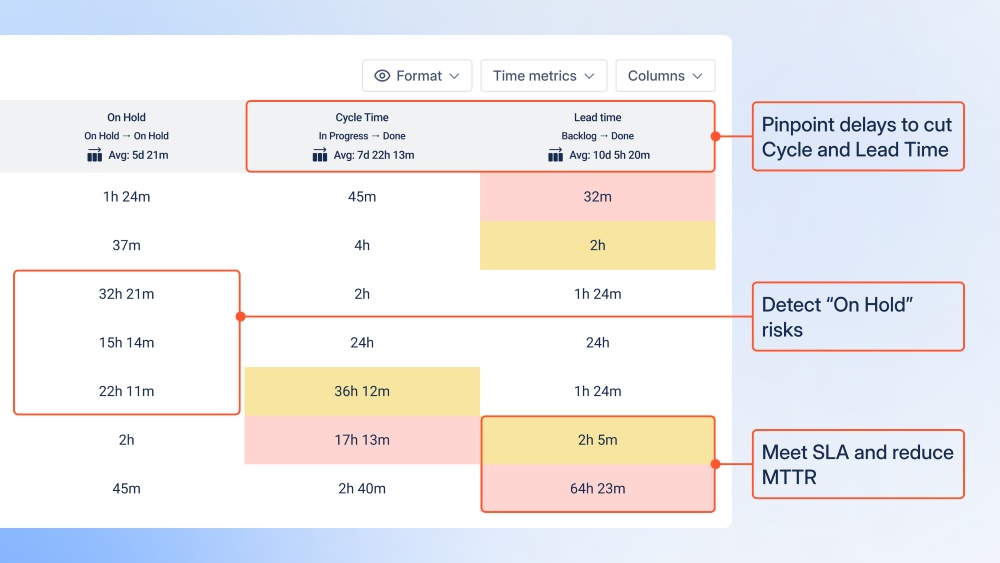
Time Metrics Tracker automatically calculates the duration work items spend in each status to optimize delivery speed. It provides clear visibility into Lead and Cycle Time metrics, helping teams identify exactly where delays occur. By visualizing transitions, managers can pinpoint process bottlenecks and streamline workflows effectively. This data-driven approach transforms Jira activity into actionable insights to accelerate project completion.

Cut Cycle Time and Lead Time Optimization Cut Cycle Time and Lead Time Optimization

Benefits:

  • Eliminate Bottlenecks: Instantly identify which workflow stages cause the longest delays.
  • Automated Reporting: Save time by replacing manual spreadsheets with real-time, automated duration tracking.
  • Improved Efficiency: Optimize team performance by focusing on stages that require process refinement.
Step 2 of 4

Performance Dashboards

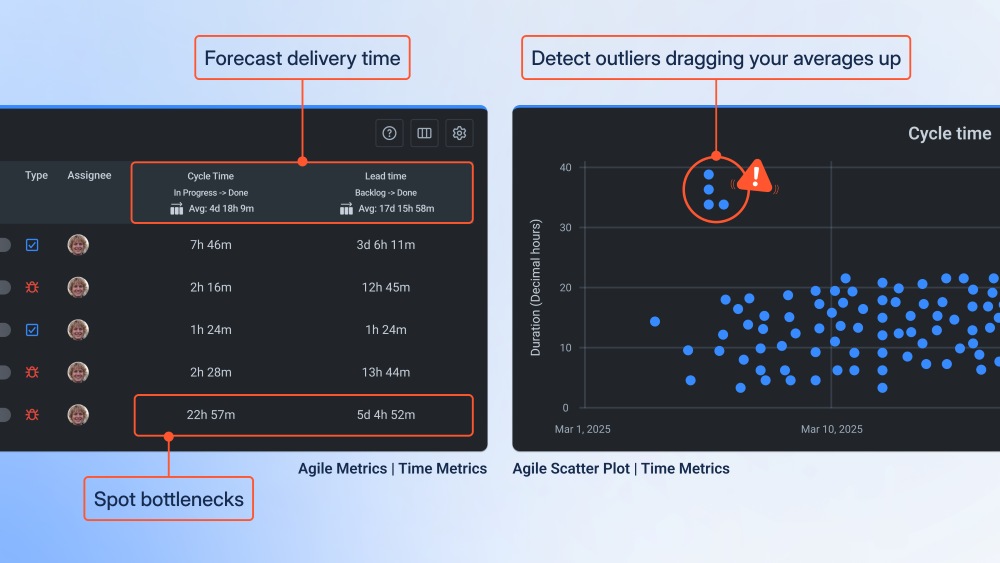
This feature enables teams to visualize performance trends and detect specific issues that inflate Cycle Time through integrated Jira dashboards. By combining the Agile Metrics Gadget with Scatter Plots, users can identify "outlier" tickets that deviate from the norm. This comprehensive view provides early warning signals of project slowdowns before they impact final deadlines. It serves as a critical tool for data-driven quarterly planning and long-term team health monitoring.

Performance Dashboards Performance Dashboards

Benefits:

  • Proactive Risk Management: Identify early signals of delivery slowdowns to address issues before they jeopardize deadlines.
  • Precision Planning: Use performance trends and velocity data to support more accurate Quarterly (OKR) planning.
  • Identify Process Outliers: Quickly spot specific tickets that skew average metrics to understand the root cause of delays.
  • Unified Visibility: Combine high-level delivery trends with granular ticket data in one centralized dashboard view.
Step 3 of 4

Work in Progress Management & Capacity Balancing

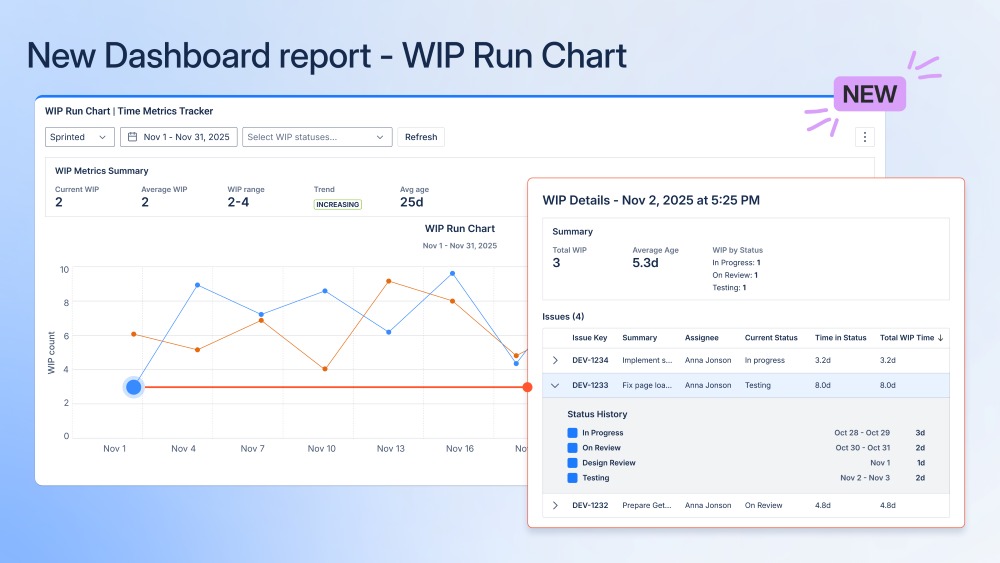
WIP Run Charts to help teams monitor work trends and prevent productivity loss from overloading. It allows managers to track the average age of open tasks, providing early warnings for potential delivery delays or team burnout. By drilling down into specific issue details, teams can identify exactly what is blocking progress and disrupting the flow. Maintaining a balanced WIP ensures a steady, predictable delivery of value while protecting team capacity.

Work in Progress Management & Capacity Balancing Work in Progress Management & Capacity Balancing

Benefits:

  • Prevent Team Burnout: Monitor work trends to ensure the team isn’t overloaded, maintaining high productivity and morale.
  • Identify Blockers Quickly: Drill down into specific issues to see what is stopping progress and resolve bottlenecks immediately.
  • Boost Predictability: Maintain a steady flow of work by keeping WIP levels consistent with team capacity.
  • Reduce Cycle Time: Track and lower the "WIP Age" to ensure tasks don't linger in the system longer than necessary.
Step 4 of 4

Customizable Work Schedules

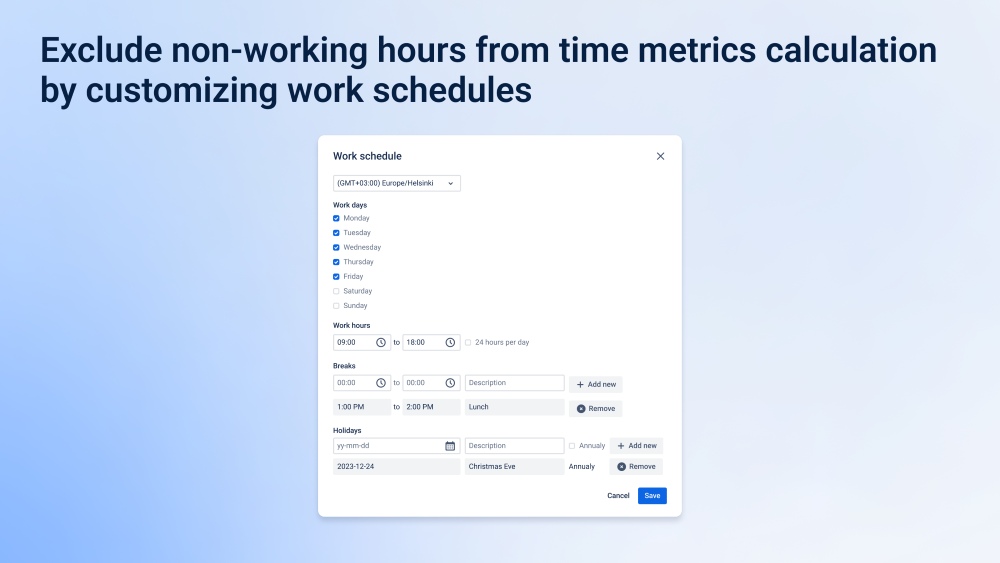
Ensures 100% accurate time reporting by excluding non-working hours, weekends, and holidays from your metrics. Users can customize specific workdays and hours to align with their team's actual availability across different time zones.

Customizable Work Schedules Customizable Work Schedules

Benefits:

  • True Accuracy: Get precise performance data by measuring only the time your team is actually "on the clock."
  • Global Team Alignment: Set unique schedules and time zones for distributed teams to ensure fair and consistent reporting.
  • Accurate SLA Monitoring: Ensure SLA are measured only during active business hours to prevent false breaches over weekends or holidays.