SaaSJet - SLA Time and Report for Jira

SaaSJet - SLA Time and Report for Jira

A comprehensive solution for defining, tracking, and reporting on Service Level Agreements (SLAs). It helps teams stay ahead of deadlines with automated notifications, multi-calendar support, and detailed performance analytics.
Step 1 of 6

SLA Time and Report / SLA Configuration

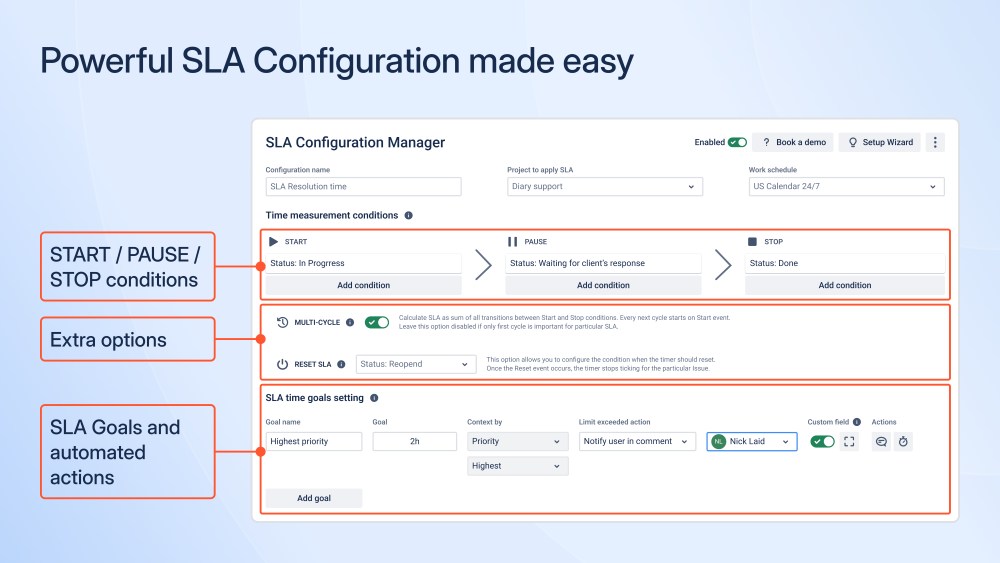
SLA Time and Report is an advanced SLA and OLA management solution for Jira that allows teams to define, measure, and automate service-level agreements. The SLA Configuration feature enables teams to build flexible SLA rules based on real working conditions, including how issues move through workflows and how time should be counted. This helps ensure that SLA measurements accurately reflect actual service delivery rather than simplified or static configurations. By providing more reliable SLA tracking, the solution supports better service reviews, more informed operational decisions, and clearer alignment with customer and internal performance expectations.

SLA Time and Report / SLA Configuration SLA Time and Report / SLA Configuration

Benefits:

  • Enables precise SLA definitions aligned with real workflows and business hours
  • Supports advanced conditions: multi-cycle SLAs, resets, and custom triggers
  • Reduces SLA breaches caused by incorrect or oversimplified Jira configurations
  • Scales across multiple projects and teams with centralized SLA logic
Step 2 of 6

SLA Automation

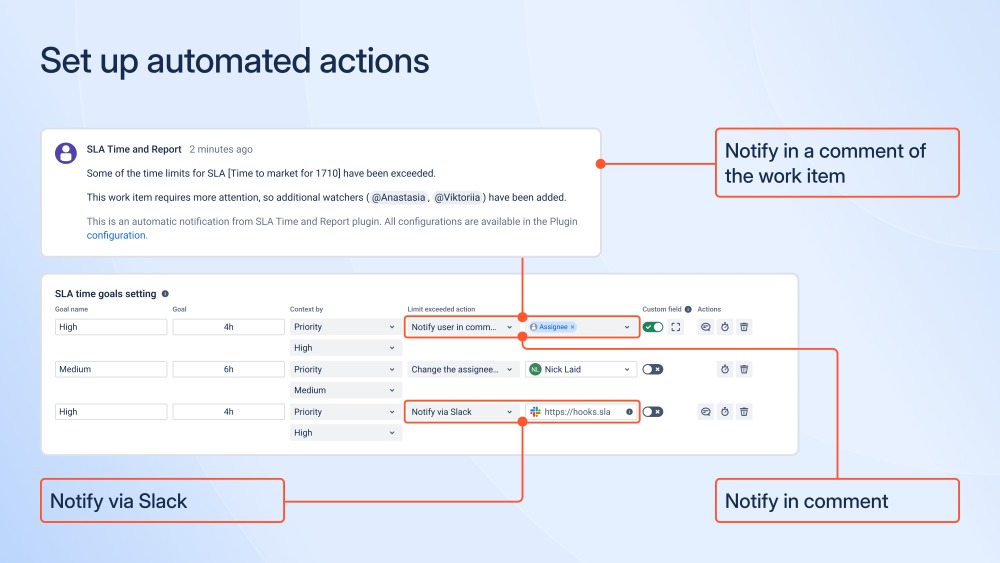
SLA Automation allows SLAs to be automatically adjusted based on factors such as priority, severity, complexity, request type, or custom business logic. The feature supports automated actions including notifications, escalations, and status updates when SLA thresholds are approaching or have been breached. By reacting to changes in work items in real time, automation ensures that SLA handling stays aligned with actual service conditions. This helps organizations reduce manual oversight, respond faster to critical situations, and maintain consistent SLA execution at scale.

SLA Automation SLA Automation

Benefits:

  • Automates SLA enforcement without manual monitoring
  • Helps teams act before breaches occur with pre-breach automation
  • Reduces operational risk and response delays
  • Adapts SLA automation based on work item changes
Step 3 of 6

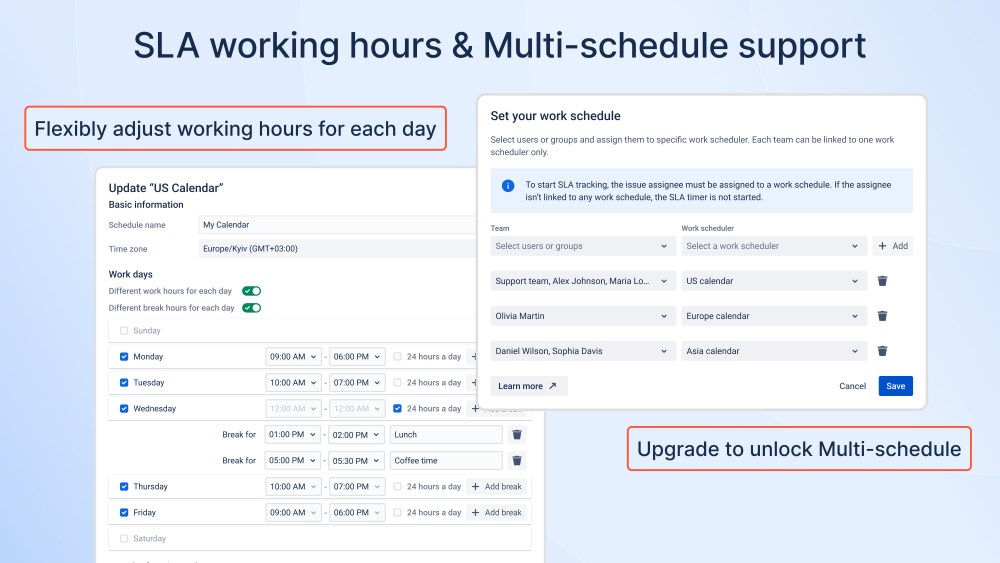
Multi-Calendar & Time Zone–Aware SLAs

Multi-Calendar and time zone-aware SLAs allow organizations to measure SLA time based on different working schedules, time zones, and regional calendars. Each SLA can be linked to a specific calendar, ensuring that time is counted accurately according to local working hours and holidays. This is especially important for distributed or global teams that operate across multiple regions and support models. By aligning SLA measurement with local calendars and time zones, organizations can ensure fair tracking and avoid misleading SLA breaches caused by time differences.

Multi-Calendar & Time Zone–Aware SLAs Multi-Calendar & Time Zone–Aware SLAs

Benefits:

  • Ensures fair SLA tracking across global teams
  • Supports regional compliance and enterprise operations
  • Flexibly adjust working hours for each day
  • Eliminates false breaches caused by time zone differences
Step 4 of 6

SLA Visibility

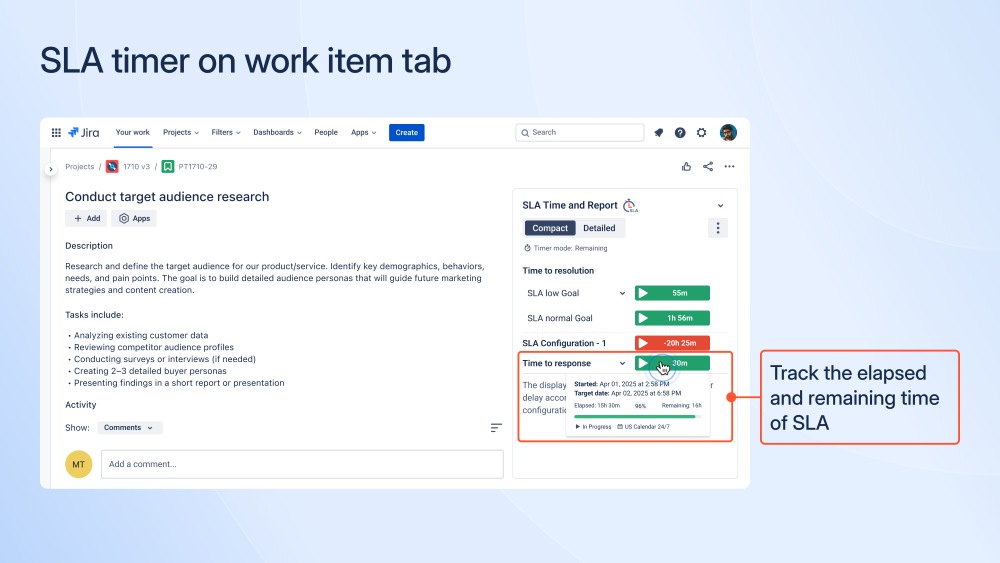
SLA Time and Report displays SLA timers directly inside Jira work items, providing real-time visibility for agents, developers, and managers. Users can instantly see remaining or elapsed SLA time without switching to external reports or dashboards. This immediate visibility helps teams stay aware of SLA commitments while working on issues, rather than discovering problems after the fact. By making SLA status visible at the point of work, teams can respond earlier, coordinate more effectively, and better align daily actions with service expectations.

SLA Visibility SLA Visibility

Benefits:

  • Improves SLA awareness at the issue level
  • Reduces missed SLAs due to lack of visibility
  • Increases accountability across teams
  • Helps teams prioritize critical work in real time
Step 5 of 6

SLA Monitoring

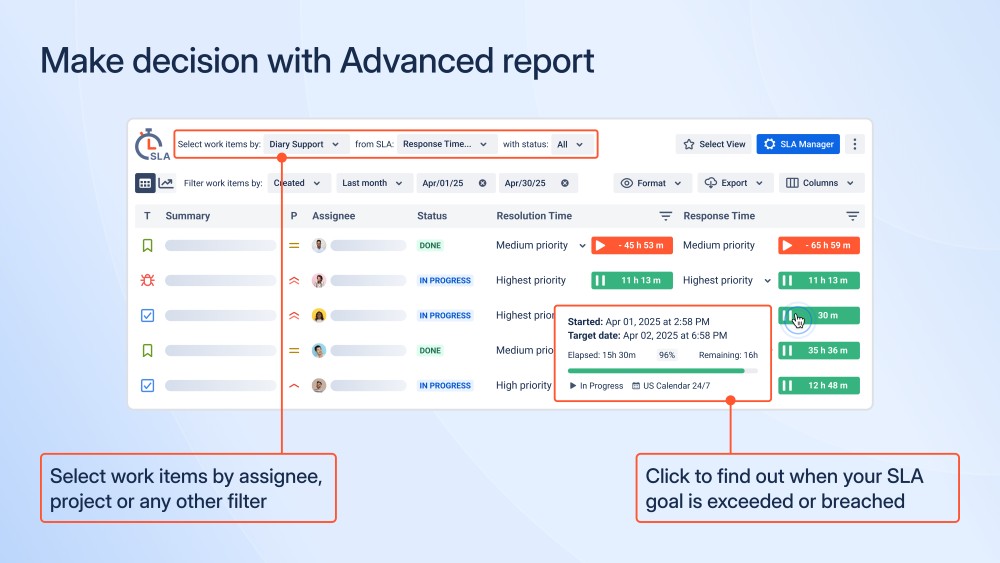
The SLA Grid provides a centralized, real-time view of SLA performance across Jira work items. It allows teams to monitor SLA status, remaining or elapsed time, and breach indicators in a single, structured table. This centralized view helps teams stay on top of SLA commitments without relying on manual checks or fragmented reports. By making SLA risks visible across all work items, teams can proactively manage workloads, focus on high-risk issues, and support more reliable service delivery.

SLA Monitoring SLA Monitoring

Benefits:

  • Centralized overview of SLA status for all work items
  • Enables proactive monitoring and early identification of SLA risks
  • Reduces manual checks and improves response prioritization
  • Flexible filtering supports
Step 6 of 6

SLA Reporting & Performance Charts

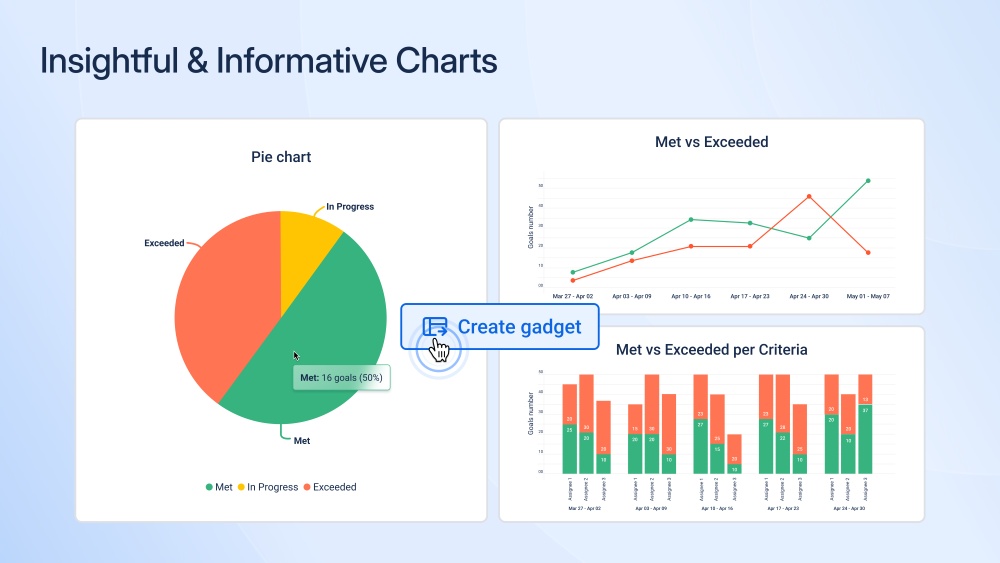
SLA Reporting with Performance Charts provides visual analytics to evaluate SLA performance over time. The feature includes insights such as SLA success rates, Met vs Exceeded charts, comparisons across multiple SLAs, and trend-based analysis. These visual reports help teams move beyond individual SLA events and understand overall performance patterns. By making SLA data easier to interpret and review, the feature supports performance discussions, service optimization, and informed decision-making at both team and management levels.

SLA Reporting & Performance Charts SLA Reporting & Performance Charts

Benefits:

  • Transforms SLA data into clear, visual performance insights
  • Supports trend analysis and long-term SLA optimization
  • Helps management evaluate compliance and service quality
  • Integrates with Jira Dashboards and supports report export