Deviniti - SLA Time Management

Deviniti - SLA Time Management

Tracks precise service level agreements with custom calendars and real-time countdowns to ensure teams meet their resolution and response deadlines.
Step 1 of 4

SLA Time Management

Easily manage and track SLAs across your Jira ecosystem. The SLA Time Management app streamlines service level agreements (SLA) management and tracking within Jira and JSM by offering centralized SLA configuration, real-time monitoring, and flexible calendar settings. The app enables precise SLA configurations based on multiple projects, specific time goals, JQL queries, and multiple conditions, ensuring that service commitments are consistently met.

SLA Time Management SLA Time Management

Benefits:

  • Centralized SLA management Get one central place to manage SLAs across your Jira & JSM projects. With native assets integration, you can also trigger and control SLAs directly from your asset data.
  • Full SLA visibility for all users With SLA Time Management, SLA progress is visible to agents, Jira users, and customers in the portal. This boosts transparency and cutting down on repetitive follow-ups.
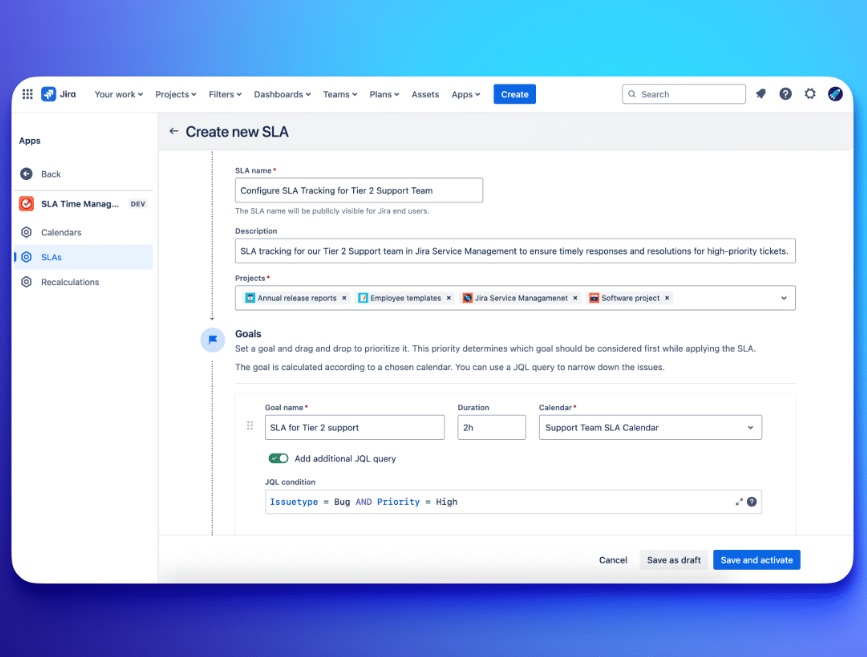
  • Advanced SLA configuration Admins can go beyond simple timers with fixed dates, business day offsets, or asset-based goals. Moreover, JQL, several calculation methods and AND/OR logic enable applying precise SLA rules only where they’re needed.
  • Smart SLA management at a lower cost SLA Time Management delivers the key SLA features ITSM teams rely on - without extra complexity. Plus, the app is over 3x more affordable than Time to SLA.
Step 2 of 4

Easily tailor and manage your SLAs

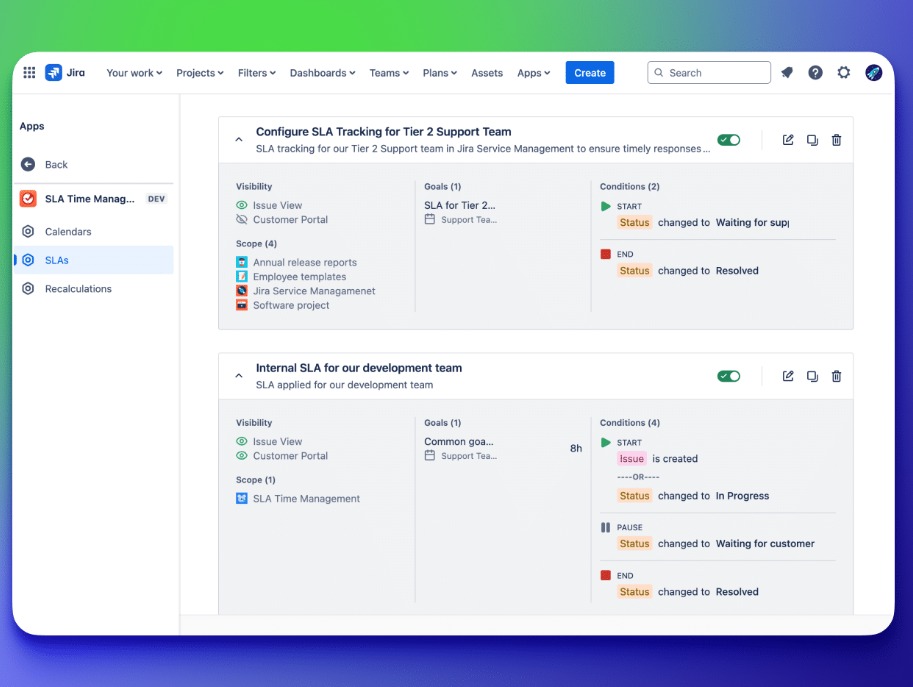
Unified SLA management: Centralize SLA setup for Jira and JSM in one app, applying consistent policies across different projects.

Easily tailor and manage your SLAs Easily tailor and manage your SLAs

Benefits:

  • Custom calendars & conditions: Align SLAs with actual work hours, weekends, and holidays, and use JQL plus multi‑conditional rules (AND/OR) to define start/stop/pause.
  • Precise SLA targeting: Use JQL to apply SLAs only to specific work items—no more “all issues” mandates—for exact scope control.
  • Easy import of national holidays: Conveniently import national holidays from our ISO 3166-2 compliant database.
  • Flexible recalculation: Easily edit and recalculate SLAs at any time, even for new, active, or closed issues, to quickly adapt to changes or corrections.
Step 3 of 4

Offer leaders real-time tracking & performance control

Define unique SLAs for each team: Make sure that response and resolution targets align with the urgency and complexity of particular requests.

Offer leaders real-time tracking & performance control Offer leaders real-time tracking & performance control

Benefits:

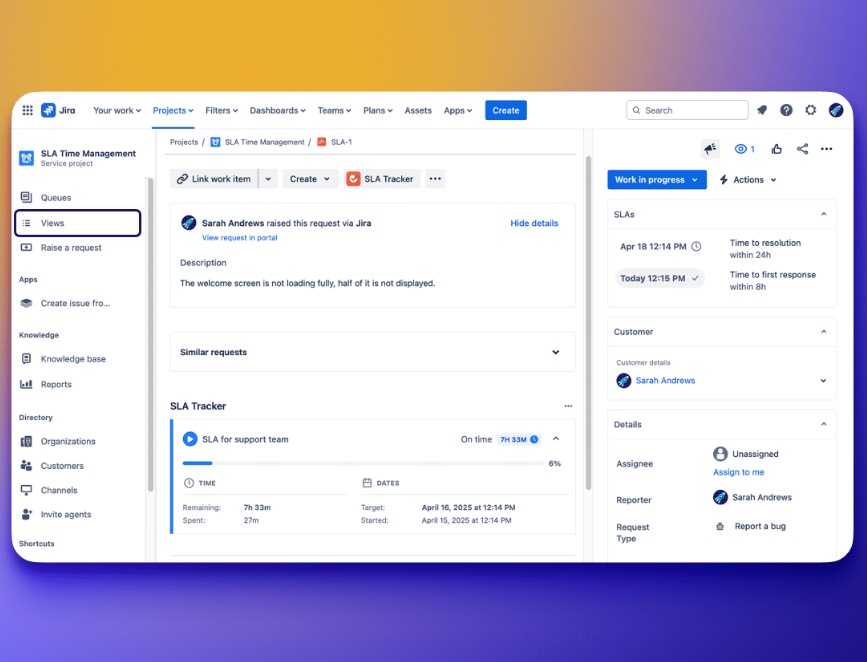
  • Boost team efficiency with SLA tracking: Provide your team with a live view of task deadlines and priorities to resolve issues faster and pinpoint bottlenecks.
  • Track time spent in each status: Set goal-free SLAs to monitor specific status durations, gaining insights into workflow slowdowns.
  • Cross-role SLA visibility in issue view: Enable both agents and end users to view the SLA panel directly within issues, boosting transparency and fostering seamless cross‑team collaboration.
  • Monitor SLA performance effortlessly: Use SLA custom fields in Jira’s Issue Navigator or Queues for Jira & JSM to easily prioritize tasks, balance team workloads, and streamline issue management.
Step 4 of 4

Provide customers real-time SLA visibility

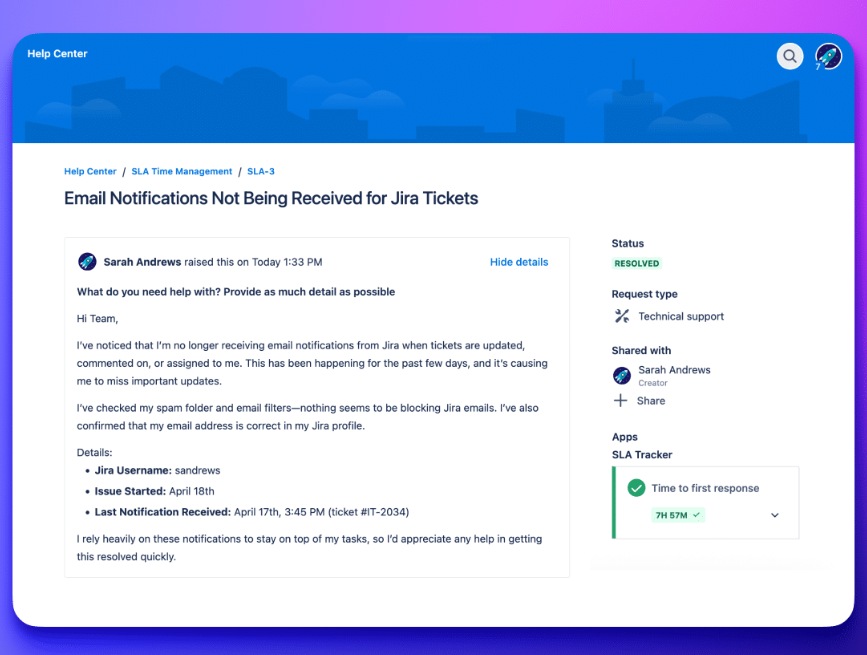
Intuitive SLA panel in customer portal: Let customers effortlessly check estimated resolution time (based on the SLAs) directly from their request view, reducing uncertainty and follow-up queries. Communicate proactively and keep users consistently informed.

Provide customers real-time SLA visibility Provide customers real-time SLA visibility

Benefits:

  • Clear SLA insights: Provide customers with more details on the issue view—including a dynamic progress bar, clear start dates, and planned completion dates—that promote transparency and build trust.
  • Accurate time-zone adjusted SLAs: Display SLAs according to the customer’s local time zone. Eliminate confusion and ensure precise deadline awareness.
  • SLA column view in My Requests app: Display SLA status as a dedicated column across all your requests. Empower customers to monitor deadlines at a glance and proactively follow up on at‑risk requests.